背景介绍
EV SSL 证书(英文全名为:Extended Validation SSL Certificate,扩展验证证书),是全球领先的数字证书颁发机构和主流的浏览器开发商共同制定的一个新的 SSL 证书严格身份验证标准,让新一代安全浏览器能识别出 EV SSL 而在地址栏显示为绿色,让普通消费者能确信正在访问的网站就是通过权威第三方严格身份验证的现实世界的真实实体,从而增强消费者信心,促成更多在线交易。
EV SSL 要求
EV SSL 证书的要求:
- 具有已知为 EV 策略的策略标识符(OID,Object Identifier);
- 根证书的指纹与固定的策略标识符匹配(EV-OID);
- 证书必须通过在线吊销检查;
- 如果证书的颁发日期在 2015/1/1 之后,则证书必须支持证书透明性(CT,Certificate Transparency);
- 证书必须由受信任的根颁发,如果存在多个 CA,则所有证书链需均有效;
可以将这些要求细分为叶证书、中级证书、根证书和 PKI 基础结构的要求,实际测试自签的 EV 没有证书透明性也可以工作。
PKI 基础结构要求
- OCSP 或 CRL 响应器均可用,以便浏览器检查吊销状态;
- 自行为 EV 证书定义 OID;
其中,EV OID 可以是任何 OID,自定义或随机均可,但是需要记住,下一步会用到。
根证书要求
- 基本限制扩展名(Basic Contraints Extention)必须是 CA;
- 其中,如果是自签,则需要添加到系统信任中,并将上一步的 EV OID 添加到扩展中。
中级证书要求
- 基本限制扩展名必须是 CA;
- 在扩展名中设置了 OCSP 或 CRL URL,以便浏览者检查吊销状态;
- 扩展密钥用法(extendedKeyUsage)必须包含 ServerAuth;
- 其中,自签的一般不会有中级证书,也可以正常工作。
叶子证书的要求
- 基本约束扩展必须是最终实体(End Entity);
- 在扩展名中设置了 OCSP 或 CRL URL,以便浏览者检查吊销状态;
- 扩展密钥用法必须包含 ServerAuth;
- 证书策略扩展必须具有 OID 2.23.140.1.1 和上面自定义的 EV-OID;
- 使用者可分辨名称(X.509 Name)必须包含 CN(commonName)、O(organizationName)、ST(streetAddress)、C(countryName)
SerialNumber、jurisdictionStateOrProvinceName、jurisdictionCountryName;不能是通配符证书,必须包含 SubjectAltNames,并将域名(FQDN)嵌入到此扩展名中;
申请颁发
下面我们就以OpenSSL 1.0.2k-fips,域名 vircloud.net 为例,来创建一个 EV SSL 证书。
修改 openssl.cnf
OpenSSL 默认是不支持,也无法识别 EV 的 jurisdictionStateOrProvinceName、jurisdictionCountryName 等扩展字段,因此我们需要将这些字段的 OID 添加到 OpenSSL 配置中。
[ new_oids ]
......
trustList = 2.16.840.1.113730.1.900
jurisdictionOfIncorporationLocalityName = 1.3.6.1.4.1.311.60.2.1.1
jurisdictionOfIncorporationStateOrProvinceName = 1.3.6.1.4.1.311.60.2.1.2
jurisdictionOfIncorporationCountryName = 1.3.6.1.4.1.311.60.2.1.3
......
[ req_distinguished_name ]
businessCategory = Business Category
serialNumber = Serial Number
streetAddress = Street Address
postalCode = Postal Code
jurisdictionOfIncorporationLocalityName = Jurisdiction Locality Name
jurisdictionOfIncorporationStateOrProvinceName = Jurisdiction State or Province Name
jurisdictionOfIncorporationCountryName = Jurisdiction Country Name
......
其中,2.16.840.1.113730.1.900(trustList)是本次我们自定义的 EV OID。
生成证书请求 csr
直接看示例,假定你已经生成了 CA 证书可以直接使用,没有的话参考《正确使用 OpenSSL 自签发代码|邮件|域名|IP 证书》自建 CA 一节:
[root@ct demoCA]# openssl genrsa -out vircloud.net.key 2048
Generating RSA private key, 2048 bit long modulus
...........................+++
.....+++
e is 65537 (0x10001)
[root@ct demoCA]# openssl req -new -key vircloud.net.key -out vircloud.net.csr
You are about to be asked to enter information that will be incorporated
into your certificate request.
What you are about to enter is what is called a Distinguished Name or a DN.
There are quite a few fields but you can leave some blank
For some fields there will be a default value,
If you enter '.', the field will be left blank.

Business Category :Private Organization
Serial Number :22083907374219741
Street Address :501 Ellis St.
Postal Code :94043
Jurisdiction Locality Name :Mountain View
Jurisdiction State or Province Name :California
Jurisdiction Country Name :US
Country Name (2 letter code) :US
State or Province Name (full name) :California
Locality Name (eg, city) :Mountain View
Organization Name (eg, company) :VirCloud, LLC.
Organizational Unit Name (eg, section) :Technical Support Dept.
Common Name (eg, your name or your server's hostname) :vircloud.net
Email Address :support@vircloud.net

Please enter the following 'extra' attributes
to be sent with your certificate request
A challenge password []:
An optional company name []:
其中,Business Category(业务类别)、Serial Number(序列号/营业执照号码)、Street Address(公司详细街道地址)、Postal Code(公司地址邮政编码)、Jurisdiction Locality Name(公司注册地/辖区名称)、Jurisdiction State or Province Name(注册州/省/管辖州或省名称)、Jurisdiction Country Name(注册国家/地区、管辖国家/地区名称) 是与普通证书签发不一样的地方。我们在上一步的 openssl.cnf 做了定义。
编辑扩展配置
使用者可选名称、CRL 分发点、OCSP 等信息无法直接在 csr 中体现,需要在签发时附加,示例如下:
[root@ct demoCA]# vim openssl_v3.ext
authorityKeyIdentifier=keyid,issuer
basicConstraints=CA:FALSE
keyUsage=digitalSignature, keyEncipherment
extendedKeyUsage=serverAuth, clientAuth, ikeIntermediate

#使用者可选名称
subjectAltName=@SubjectAlternativeName

#证书在线查询吊销情况
authorityInfoAccess=@ocsp_section

#证书吊销列表
crlDistributionPoints=@crl_section

#OID 策略
certificatePolicies=2.23.140.1.1, @entrust

[ SubjectAlternativeName ]
DNS.1 = vircloud.net
DNS.2 = www.vircloud.net

[ crl_section ]
URI.0 = http://api.uuin.top/cert/vcca.crl

[ ocsp_section ]
OCSP;URI.0 = http://api.uuin.top/cert/ocsp
caIssuers;URI.0 = http://api.uuin.top/cert/cacert.crt

[ entrust ]
policyIdentifier=2.16.840.1.113730.1.900
CPS.1 = "https://api.uuin.top/cert/"
其中,OCSP 和 CRL 两种吊销验证,有定义一种就可以了,不要求都定义,当然也可以都定义。
- OCSP 搭建方法可以参考《利用 OpenSSL 搭建自签 SSL 证书的 OCSP 状态在线验证服务》;
- CRL 通过命令 `openssl ca -gencrl -out vcca.crl` 生成吊销列表,然后放到相应目录下即可;
其中,OID 策略 `2.23.140.1.1` 是 EV 的重要标识,`2.16.840.1.113730.1.900` 则是本次我们自定义的 EV OID(ANSI Organizational Identifier)。
签发 EV SSL
示例如下:
[root@ct demoCA]# openssl ca -in vircloud.net.csr -out vircloud.net.crt -extfile openssl_v3.ext -days 365
Using configuration from /etc/pki/tls/openssl.cnf
Check that the request matches the signature
Signature ok
Certificate Details:
Serial Number: 14 (0xe)
Validity
Not Before: Jul 16 05:27:24 2020 GMT
Not After : Jul 16 05:27:24 2021 GMT
Subject:
countryName = US
stateOrProvinceName = California
localityName = Mountain View
organizationName = VirCloud, LLC.
organizationalUnitName = Technical Support Dept.
commonName = vircloud.net
emailAddress = support@vircloud.net
businessCategory = Private Organization
serialNumber = 37421974122083907
streetAddress = 501 Ellis St.
postalCode = 94043
jurisdictionOfIncorporationLocalityName = Mountain View
jurisdictionOfIncorporationStateOrProvinceName = California
jurisdictionOfIncorporationCountryName = US
X509v3 extensions:
X509v3 Authority Key Identifier:
keyid:23:48:DD:A4:97:2A:70:CB:29:D8:9C:48:A4:30:E2:43:E5:14:5B:D3

X509v3 Basic Constraints:
CA:FALSE
X509v3 Key Usage:
Digital Signature, Key Encipherment
X509v3 Extended Key Usage:
TLS Web Server Authentication, TLS Web Client Authentication, ikeIntermediate
X509v3 Subject Alternative Name:
DNS:vircloud.net, DNS:www.vircloud.net
Authority Information Access:
OCSP - URI:http://api.uuin.top/cert/ocsp
CA Issuers - URI:http://api.uuin.top/cert/cacert.crt

X509v3 CRL Distribution Points:

Full Name:
URI:http://api.uuin.top/cert/vcca.crl

X509v3 Certificate Policies:
Policy: ExtendedValidation
Policy: trustList
CPS: https://api.uuin.top/cert/

Certificate is to be certified until Jul 16 05:27:24 2021 GMT (365 days)
Sign the certificate? [y/n]:y

1 out of 1 certificate requests certified, commit? [y/n]y
Write out database with 1 new entries
Data Base Updated
在这一步中,可能会出现错误,提示 OID 无法识别,这是因为编辑扩展配置时 OID `2.23.140.1.1` 不可以通过 @section 方式来添加,只能在 `certificatePolicies=` 中直接定义,这个问题花了我挺长时间才发现。
现在自签的 EV SSL 证书已经签发完成,接下来我们把证书加到网站,看看效果如何。
验证 EV SSL
将证书应用到服务器的方法就不赘述了,会研究 EV SSL 应该都知道怎么操作,直接来看效果:
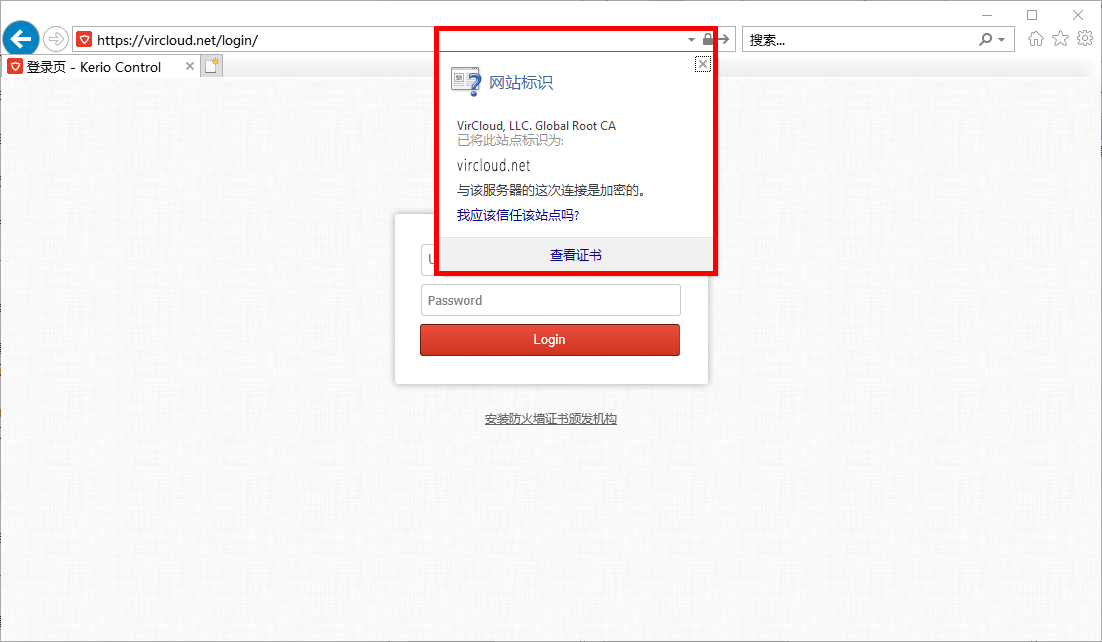
可以发现,此时显示的跟 DV 证书一样,只显示小锁,并没有显示 EV 证书小绿条的效果。
还记得上面说到得根证书要求吗?除了将 CA 证书加入系统信任,还要做什么?是的,我忘记加 OID 了。
以 Windows 为例,打开证书管理器(运行 -> mmc -> 添加/删除管理单元 -> 证书),在受信任的根证书颁发机构中找到 CA 证书,点右键 -> 属性 -> 扩展的验证,添加上面自定义的 EV OID:
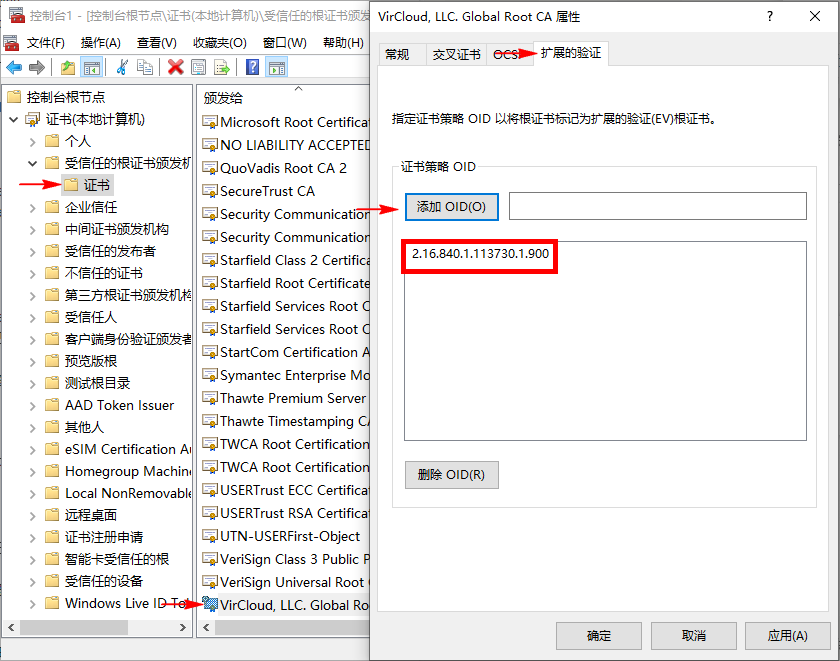
完成后我们来刷新一下网页看看有什么变化:
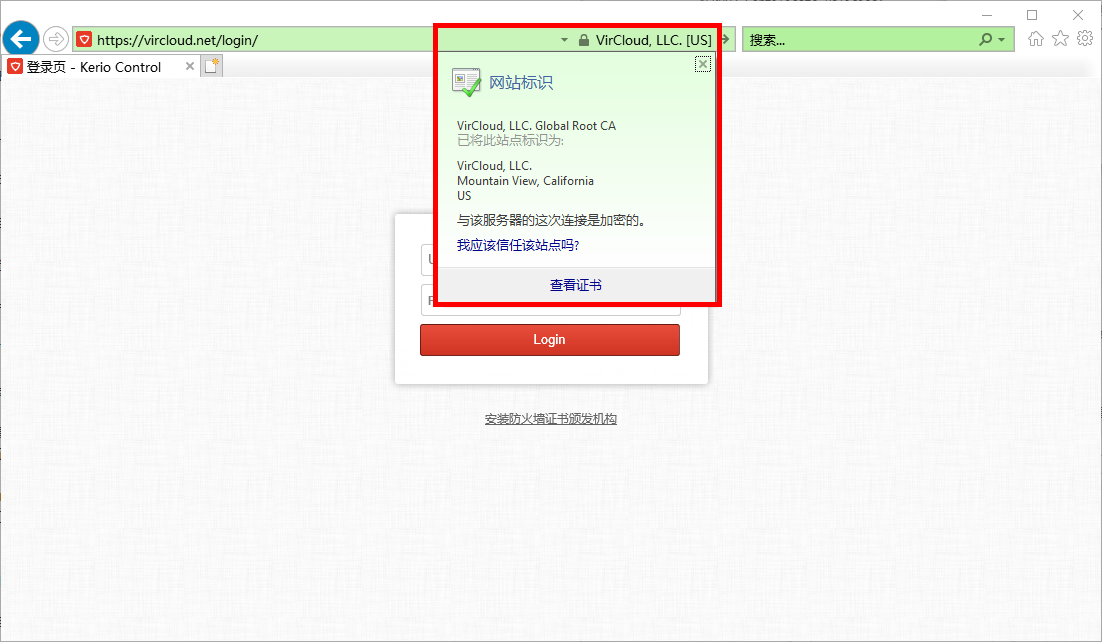
可以看到,地址栏已经变绿了,企业名称(organizationName)也显示出来了,观察 OCSP 后台,也可以发现浏览器进行了实时验证。
EV SSL 自签自此完成。
相关问题
在实际测试中,我们发现,自签的 EV SSL 仅能在 IE/Edge 核心的浏览器可以识别显示小绿条。
Firefox 等核心的浏览器可以识别 EV 证书,但默认无法识别自签 EV,与普通 DV 证书显示效果一样。如果要使 Firefox 可以识别自签 EV 证书,可参考《Adding your own EV-SSL Root CA to Firefox》,自行编译 Firefox。
Chromium 等核心的浏览,早期版本(比如 76 版本)可以显示高亮的绿色公司名称,但新版(比如 77 及之后版本)已经无法区别 EV、OV 还是 DV 证书,一律显示小锁了。
签发中文证书
默认情况下,按上面的步骤签发含中文的证书,显示会出现乱码,我们应该在生成请求文件 csr 时用以下命令:
[root@ct demoCA]# openssl req -utf8 -new -key vircloud.net.key -out vircloud.net.csr